Spring Into Style: Editable Easter Flyers & Social Posts
Spring has a unique energy—it’s a time of renewal, color, and celebration. For designers, marketers, and small business owners, this season presents a golden opportunity to connect with audiences through vibrant visuals. Whether you’re promoting an Easter event, launching a spring sale, or simply refreshing your brand’s social feed, having the right design assets can make all the difference. That’s where a well-crafted, fully editable Easter flyer template comes in, offering both flexibility and professional polish without starting from scratch.
Why Editable Templates Save Time and Boost Creativity
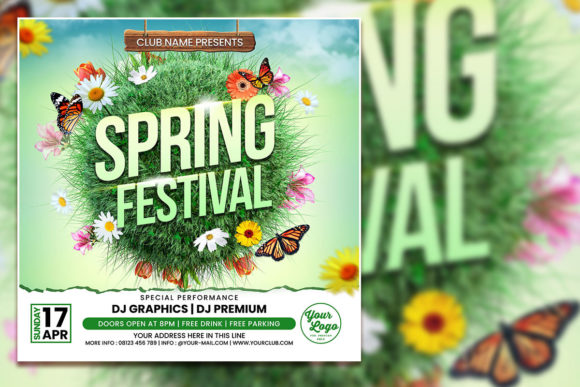
Imagine this: you’ve got an Easter brunch event to promote next week, or you’re a boutique owner wanting to showcase spring arrivals. Designing from zero can be time-consuming, especially when you’re juggling multiple roles. An editable PSD template, like the one described here, gives you a head start. With dimensions of 2000 x 2000 pixels at 300 DPI, it’s optimized for both print and digital use—perfect for social media posts, posters, or even local flyers. The RGB color mode ensures vibrant hues that pop on screens, while the organized layers in Adobe Photoshop make customization intuitive.
What makes this approach practical is the balance between structure and freedom. You’re not locked into a rigid design; you can swap out photos, adjust text, and tweak colors to match your brand’s palette. For instance, if you’re a florist, you might replace the template’s placeholder image with a snapshot of your spring arrangements. If you’re a café owner, you could overlay your logo and adjust the font to reflect your cozy, welcoming vibe. This level of customization helps maintain visual consistency across your marketing materials, reinforcing brand recognition with every post.
Practical Applications for Businesses and Creators
Think beyond a single event. A versatile Easter flyer template can serve multiple purposes throughout the spring season. Here’s how different professionals might leverage it:
- Social Media Graphics: Resize the template for Instagram, Facebook, or Pinterest. The square format works seamlessly for feeds, while you can adapt it for Stories or carousels.
- Print Materials: Use it for in-store posters, community bulletin boards, or direct mail invitations. The high resolution ensures crisp prints, even at larger sizes.
- Digital Products: If you sell digital goods, like printable party kits or seasonal planners, this template can be integrated into your product line with minimal adjustments.
- Brand Collateral: Align the design with your existing brand identity—update the fonts to match your logo, or use the color picker to ensure hue consistency with your website and packaging.
- Email Marketing: Create eye-catching headers or promotional banners for spring newsletters, driving traffic to your Easter sale or event registration page.
For content creators and bloggers, this kind of asset is a time-saver. Instead of spending hours in Photoshop, you can focus on crafting compelling copy or planning your content calendar. The included JPG file is handy for quick previews or sharing with clients, while the TXT help file with font download links ensures you can replicate the design’s typography accurately.
Typography Tips for a Cohesive Spring Look
Fonts do more than convey words—they set the mood. A playful script font might suit a family-oriented Easter egg hunt, while a clean sans serif could work better for a corporate spring networking event. When editing the template, consider these practical tips:
- Match the Font to Your Message: If your event is elegant, opt for a serif font with classic appeal. For a modern, casual vibe, a rounded sans serif or handwritten font can add warmth.
- Prioritize Readability: Ensure text is legible at both small and large sizes. Test the design on your phone and in print to catch any issues with spacing or contrast.
- Limit Font Styles: Stick to two or three complementary fonts—one for headlines, another for body text, and perhaps a third for accents. This keeps the design cohesive without overwhelming viewers.
- Check Commercial Licensing: If you’re using the template for business purposes, verify that the included fonts are licensed for commercial use. The help file should provide links to download fonts, but always review the terms.
Remember, typography influences perception. A well-chosen font can make your Easter promotion feel festive yet professional, encouraging engagement and sharing. It’s a subtle but powerful way to enhance your brand’s visual communication.
Maximizing Your Template for Marketing Success
Once you’ve customized your flyer or social post, think strategically about distribution. Pair the visual with a clear call to action—whether it’s “Reserve Your Spot,” “Shop the Spring Collection,” or “Join Our Community.” Share it across multiple platforms to maximize reach, and consider A/B testing different versions to see which resonates most with your audience.
For small businesses, this is also a chance to collaborate. Partner with local vendors for a joint Easter event, and use the template to create co-branded materials. This not only shares the design workload but also expands your audience through cross-promotion. Meanwhile, marketers can track engagement metrics to refine future campaigns, using the template as a baseline for seasonal content planning.
Ultimately, a resource like this editable Easter template is about efficiency and empowerment. It lets you focus on what you do best—whether that’s baking, designing, or running a business—while ensuring your spring promotions look polished and professional. As you dive into the season, consider how thoughtful design can elevate your message, connect with your community, and bring a fresh burst of energy to your brand’s visual storytelling.