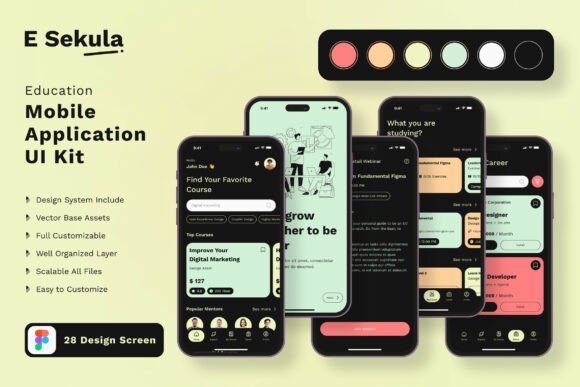
Streamline Your EdTech Startup with This Comprehensive UI Kit
Let’s face it: the barrier to entry for launching a digital product has never been lower, yet the difficulty of making that product look professional has never been higher. If you are an entrepreneur, a startup founder, or a designer working in the education sector, you know the struggle. You have a brilliant idea for a mobile application—perhaps a language learning tool, a student management portal, or a gamified tutoring platform—but the gap between a wireframe and a polished, market-ready interface is vast. Hiring a UI/UX agency can drain your runway before you even launch, and starting from scratch in design software is a time sink that delays your revenue. This is exactly where having the right design assets becomes not just helpful, but essential for survival.
Bridging the Gap Between Idea and Execution
The Education Application Mobile UI KIT is specifically engineered to solve this "cold start" problem. It consists of 28 pixel-perfect screen designs and over 80 UI elements, all tailored for the modern educational experience. But what does that actually mean for your business process? It means you don’t have to reinvent the wheel. You don’t need to spend weeks debating button styles, card layouts, or navigation flows. This template provides a robust visual foundation that allows you to focus on what truly matters: your content and your user experience strategy.
For a small business owner or a content creator, time is your most valuable currency. By utilizing a pre-built UI kit in Figma, you are effectively buying back weeks of design time. The kit is fully editable, meaning you aren’t locked into a rigid structure. If your branding requires a specific color palette to evoke trust and calm, you can change the color style globally with a few clicks. If you need to add specific modules for user progress tracking or video integration, the 100% vector layers and symbol objects allow you to scale and modify elements without breaking the design integrity.
Practical Applications for Modern Branding
When we talk about "design assets," we often think strictly of the app itself. However, the versatility of a high-quality UI kit extends far beyond the mobile screen. As a creative professional, you can leverage these assets to build a cohesive brand identity across multiple touchpoints. Consider the visual consistency required when launching a new product. You need your mobile app to look like your website, your social media graphics, and your pitch deck.
Because the Education Application Mobile UI KIT utilizes 100% scalable vectors and free fonts, you can easily export elements to create other marketing materials. For instance:
- Social Media Graphics: Use the "Course Cards" or "Achievement Badges" from the kit to create engaging Instagram Stories or Facebook ads. The clean, modern typography included in the kit ensures your text is readable and professional.
- Pitch Decks and Presentations: If you are seeking investors, you need a polished presentation. By pulling the UI elements into your slide deck, you demonstrate that you have a mature product vision, not just a concept.
- Web Design: The aesthetic principles used in mobile design—clean lines, ample white space, and intuitive iconography—translate beautifully to landing pages. You can use the kit’s color schemes and typography to style your desktop site, ensuring a seamless transition for users moving between devices.
- Digital Products and PDFs: If your business model involves selling digital downloads, such as study guides or curriculum planners, you can style these PDFs using the same visual language as the app. This reinforces brand recognition every time a user interacts with your content.
Enhancing User Experience and Readability
In the education space, readability isn't just a design preference; it's a functional requirement. Whether your users are children learning to read or professionals taking a certification course, the interface must facilitate learning, not hinder it. A cluttered screen with poor typography choices can lead to cognitive overload, causing users to drop off.
This UI kit addresses readability through its "Pixel Perfect" design philosophy. The hierarchy of information is already established for you. Headlines grab attention, body text is sized for comfortable reading on mobile devices, and interactive elements like buttons are sized for easy tapping. As a designer, this allows you to focus on the nuance of the user journey rather than getting bogged down in the micro-details of spacing and padding.
Furthermore, the inclusion of "Symbol Objects" in Figma is a massive advantage for maintaining consistency. In a complex application, changing a button style or a navigation bar usually requires finding every instance and updating it manually. With symbols, you update the master component once, and the change cascades throughout the entire project. This ensures that your visual language remains consistent, which builds trust with your user base.
Customization: Making the Template Your Own
One of the biggest risks with using templates is ending up with a "cookie-cutter" look that feels generic. However, the Education Application Mobile UI KIT is designed as a starting point, not a final destination. The kit includes over 80 UI elements—from toggles and checkboxes to sliders and input fields—giving you a massive library of building blocks.
Let’s say you are building a meditation and mindfulness app for students. The default layout might be designed for a traditional learning management system. You can easily deconstruct the screens, remove the academic modules, and rearrange the elements to create a more fluid, calming interface. Conversely, if you are building a high-intensity quiz app, you can emphasize the timer elements and scoreboards.
The fact that the kit uses free fonts is another practical benefit for entrepreneurs. Often, premium design kits come bundled with expensive commercial fonts that require separate licensing for your final product. By using free fonts, you eliminate legal headaches and reduce your operational costs, allowing you to allocate budget to other areas like marketing or development.
Strategic Design for Market Success
In a saturated market, the visual presentation of your application is often the first point of differentiation. Users make snap judgments about the quality and trustworthiness of an app within seconds of opening it. If the interface looks dated or amateurish, they assume the educational content is the same.
By starting with a high-end UI kit, you immediately elevate the perceived value of your product. You are signaling to your users that you care about their experience. This is crucial for retention. In the education sector, user engagement is directly tied to learning outcomes. A well-designed interface encourages users to return, complete their courses, and recommend the app to others.
Ultimately, this resource is about removing friction. It allows designers to bypass the tedious setup phase and jump straight into the creative, problem-solving work. It gives entrepreneurs the power to prototype and test ideas rapidly without waiting for a full design cycle. Whether you are building a comprehensive school management system or a simple flashcard app, having a flexible, fully editable, and professionally designed foundation is the smartest investment you can make in your project's success.