Streamline Your EV Charging App with This Figma UI Kit
Building a mobile application from the ground up is a complex endeavor, especially in a specialized and growing market like electric vehicle charging. The journey from a wireframe concept to a polished, user-friendly interface involves hundreds of small decisions about layout, color, typography, and interaction. For designers, entrepreneurs, and small business owners, this process can be time-consuming and resource-intensive. A well-structured UI kit acts as a powerful accelerator, providing a robust foundation of pre-designed elements and screens that allow you to focus on your unique value proposition rather than reinventing the wheel.
A Practical Toolkit for Modern EV App Design
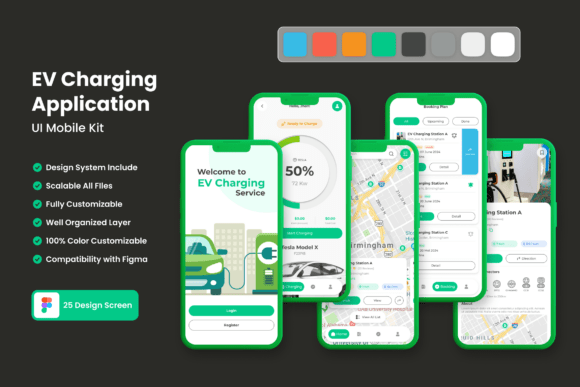
The EV Charging Mobile UI Kit is a comprehensive collection of 25 high-quality, pixel-perfect screen templates designed specifically for creating mobile applications in the electric vehicle ecosystem. This isn't just a set of static mockups; it's a fully editable design system built in Figma. The kit includes over 80 meticulously crafted UI elements, from buttons and input fields to charts and navigation bars, all constructed with 100% vector layers. This means every component is infinitely scalable without losing quality, a critical feature for designers working across different device resolutions and screen sizes.
What makes this kit particularly valuable is its foundation in modern typography and clean, functional design. The templates leverage free fonts and icon vectors, ensuring you can start prototyping immediately without additional licensing hurdles. The symbols and fully layered structure in Figma allow for seamless customization. Need to change the primary color scheme to match your brand? It’s a few clicks away. Want to adjust the spacing or add a new information module? The organized layers make it straightforward. This level of flexibility is essential for creating a cohesive brand identity that feels both professional and uniquely yours.
From Template to Tangible Brand Experience
The true power of a resource like this lies in its application across your entire visual communication strategy. While the primary use is for mobile app development, the design language established within the kit can inform your broader marketing assets and brand identity. Consider how the clean lines and user-centric layouts can translate to other touchpoints:
- Marketing & Digital Presence: Use the color palettes and UI components as a style guide for your website, landing pages, and social media graphics. The visual consistency between your app and your online marketing materials builds immediate trust and recognition with your audience.
- Presentation & Pitch Decks: Incorporate the kit's design elements into investor presentations or partnership proposals. A polished, professional visual style demonstrates attention to detail and elevates the perceived value of your project.
- Print & Physical Collateral: The scalable vectors are perfect for creating high-resolution print materials. Imagine your app's sleek icons and color scheme featured on brochures, stationery, or even signage at a charging station. This creates a seamless offline-to-online experience for your customers.
For a startup or small business in the EV space, maintaining this level of visual consistency is a game-changer. It transforms disparate design efforts into a unified brand story, making your company more memorable and professional in a competitive market.
Designing for Clarity and User Trust
In the context of an EV charging app, user experience is paramount. Drivers need to find stations, check availability, initiate charging, and process payments quickly and confidently. The UI Kit is built with this clarity in mind. The screen designs prioritize intuitive navigation, clear data visualization (like battery percentage and charging speed), and straightforward call-to-action buttons.
This focus on readability and professional presentation directly impacts user engagement and retention. A confusing interface can lead to frustration and app abandonment, while a clean, logical flow fosters trust and encourages repeat use. By starting with a foundation that already embodies these principles, you significantly reduce the risk of poor user experience and can allocate your development resources to refining unique features rather than debugging basic interface problems.
Practical Steps for Implementation
Integrating this UI kit into your workflow is a strategic process. Begin by exploring all 25 screens to understand the comprehensive scope of features covered, from onboarding and map views to charging status and user profiles. Identify which screens are most critical to your minimum viable product (MVP).
Next, dive into customization. Use the symbol library to swap out components and test different layouts. The easy-to-change color style is your first step toward brand personalization. Experiment with font pairings—while the kit includes a recommended font, you can pair it with a complementary serif or sans-serif typeface from your own brand guidelines to create a more distinctive hierarchy.
Remember, the goal is not to use the kit as-is, but to use it as a launchpad. Add your own content, integrate your specific service offerings, and refine the user flows based on your target audience's needs. The kit provides the professional scaffolding; your strategic input provides the soul.
For any designer, developer, or entrepreneur venturing into the EV charging market, starting with a well-engineered design asset like this is a wise investment. It mitigates design risk, accelerates your timeline, and provides a professional standard that helps build credibility from day one. In a rapidly evolving industry, having a polished, user-friendly interface can be the deciding factor that sets your service apart.