Vigil Cybersecurity Dashboard: A Deep Dive into High-Stakes UI Design
Imagine the control room of a modern cybersecurity operations center. The air is tense, the stakes are high, and every second counts. This is the environment that the Vigil Cybersecurity SaaS Dashboard is built to command. It’s not just a collection of charts and gauges; it’s a meticulously crafted digital cockpit designed for clarity, urgency, and precision under pressure. For designers and developers building tools for threat detection or network monitoring, Vigil offers more than a template—it provides a visual language of control and intelligence.
The Anatomy of a Security-Focused Interface
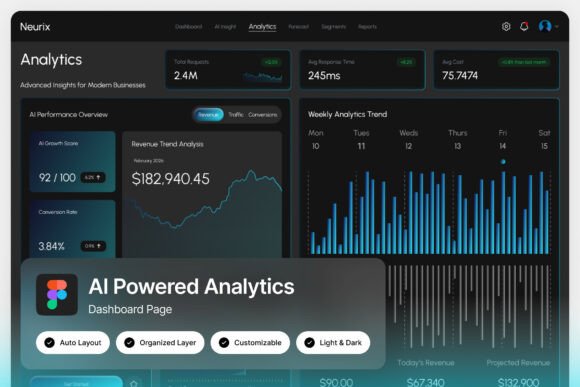
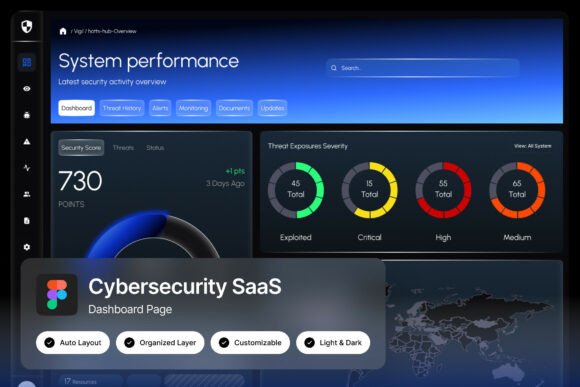
What immediately captures your attention is the deep navy and neon blue palette. This isn’t a random aesthetic choice. The dark theme reduces eye strain during long shifts, a critical factor for security analysts who stare at screens for hours. The neon blue accents serve a dual purpose: they create a striking visual hierarchy and are often associated with technology, trust, and calm precision. This color psychology is vital; the interface communicates seriousness without inducing panic, allowing users to focus on the data that matters.
Look closer, and you’ll find the components that make this dashboard a practical tool. System performance gauges provide at-a-glance health metrics. Threat monitoring panels aggregate alerts, categorizing risk by severity. Network activity charts visualize data flow, spotting anomalies in traffic patterns. Finally, real-time security alerts pulse with a controlled urgency, ensuring critical issues never blend into the background noise. Every element is placed with purpose, following the principle that in a crisis, the right information must be visible within seconds.
Beyond Cybersecurity: Adapting the Visual Framework
While Vigil is engineered for security, its design principles have broad applications. Think of any project where conveying data clarity and operational control is paramount. A logistics company could adapt this dashboard to track fleet movements and delivery statuses. A financial analytics platform could use a similar layout to monitor market shifts and portfolio performance. The core strength here is the pixel-perfect layout and well-organized layers—these are not just features for cybersecurity teams but for any design asset that needs to communicate complex information simply.
The inclusion of both light and dark mode interfaces within the Figma file is a particularly smart move. It acknowledges that context matters. A cybersecurity team might prefer the dark mode for its operational focus, while a corporate presentation of the same data might require the light mode for better readability in a brightly lit boardroom. This flexibility makes the asset far more valuable for a range of commercial projects, from internal software tools to client-facing reports.
Practical Implementation for Product Teams
For a SaaS developer or product designer, starting a new dashboard project from scratch is a massive undertaking. Vigil provides a foundational structure that saves hundreds of hours. The fully customizable nature of the file means you can swap out the cybersecurity terminology for your own metrics. The system performance gauges could become website uptime monitors. The threat panels could be repurposed for customer complaint tracking. The underlying grid, spacing, and typography work remains intact, giving you a professional, tested framework to build upon.
The practical details matter. Free Google Fonts are included, eliminating licensing headaches and ensuring you can immediately edit and export. The 1440×1024 px resolution is a standard desktop dimension, making it a realistic starting point for actual development. The included Help Guide is often the most overlooked part of a design asset, but it’s crucial for onboarding your team and ensuring everyone understands how to manipulate the components without breaking the design system.
Design as a Strategic Communication Tool
This dashboard is a masterclass in using modern typography and layout to build trust. In the context of cybersecurity, trust is everything. A clunky, confusing interface would undermine confidence in the very tool meant to protect an organization. Vigil’s clean lines, ample spacing, and deliberate use of contrast signal competence and reliability. This is a powerful lesson for any brand identity project: your visual interface is a direct reflection of your product’s reliability.
Consider how these principles apply to web design or digital products outside of security. A project management tool, a health tracking app, or a customer relationship manager all benefit from this same philosophy of calm, controlled data presentation. The goal is to reduce cognitive load for the user, allowing them to make decisions based on clear information rather than struggling to decipher the interface itself.
Getting Started and Maximizing the Asset
If you decide to incorporate this style into your work, start by analyzing its core components. Study the typographic hierarchy: how are headers, subheaders, and body text differentiated? Examine the iconography style—is it line-based or filled? How does the color accent guide the eye from one section to the next? Deconstructing a professional template like this is one of the fastest ways to level up your own design skills.
When you begin customizing, maintain the underlying system. The well-organized, named, and grouped layers are your best friend. Rename layers to match your project’s terminology, but keep the grouping structure. This ensures that other designers or developers on your team can navigate the file easily. Test your customized version with actual users if possible. Does the new data hierarchy make sense? Are the alerts still noticeable? The true test of a dashboard is its usability in a live environment.
Ultimately, the Vigil Cybersecurity SaaS Dashboard is more than a static mockup. It’s a blueprint for effective, high-stakes interface design. It demonstrates how visual choices directly support function, how aesthetics can build user confidence, and how a well-structured design system can accelerate development. Whether you’re building a security tool, a data analytics platform, or any application where clarity is critical, the principles embedded in this design offer a valuable roadmap for creating interfaces that are not only beautiful but profoundly functional.