Closify: The Warm, Modern Dashboard for Real Estate Success
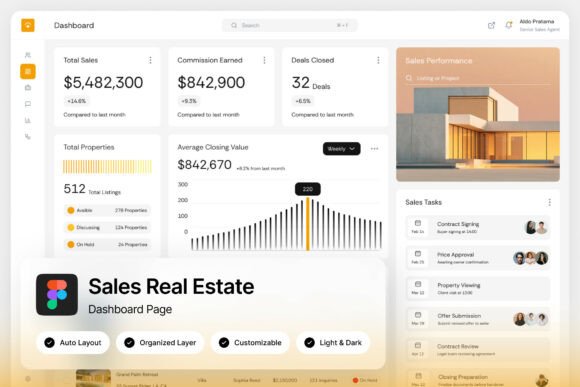
Imagine a real estate CRM that feels less like a cold, digital filing cabinet and more like the cozy, organized office of a top-performing agent. That’s the immediate impression given by the Closify Sales Real Estate Dashboard UI. It trades the typical sterile blues and grays for a light, earthy color palette—think warm beiges, soft terracottas, and muted greens—that creates an inviting and focused workspace. For designers and agencies building property sales platforms, this isn't just a pretty interface; it's a strategic tool designed to reduce visual fatigue and guide the user intuitively through high-conversion workflows, from first contact to closing day.
A Design Philosophy Built for Clarity and Conversion
What makes a dashboard truly effective? It’s the seamless marriage of form and function. Closify nails this by presenting critical data—property listings, deal pipelines, revenue cards, and sales performance charts—within a clean, uncluttered layout. The pixel-perfect design ensures every element has purpose, and the well-organized, named layers in the Figma file mean a designer can customize it without wasting hours hunting for assets. This isn't just about aesthetics; it's about creating a professional presentation that builds trust with users. When a real estate agent logs in, they should immediately see their priorities and opportunities, not struggle to find a button. The intuitive flow here is a masterclass in reducing cognitive load, allowing users to focus on what matters: nurturing leads and closing deals.
Practical Applications Beyond the Property Market
While its heart is in proptech, the design principles and visual language of Closify have surprising versatility. The earthy, modern typography and card-based layout are a goldmine for various creative projects. Consider how this style could inform:
- Brand Identity Systems: The color palette and clean lines are perfect for a boutique agency, a sustainable product line, or a wellness brand seeking a grounded, trustworthy feel.
- Marketing & Social Media Graphics: The structured yet approachable aesthetic translates beautifully to Instagram carousels, Facebook ads, or LinkedIn banners for service-based businesses, ensuring visual consistency across platforms.
- Editorial and Digital Layouts: Imagine a blog or online magazine about architecture or interior design using these UI principles for article layouts, creating a cohesive and immersive reader experience.
- Presentation Decks & Pitch Materials: The data visualization components (those performance charts) offer a sophisticated template for presenting metrics in investor decks or client reports, enhancing professional credibility.
The included light and dark mode interface is a practical consideration that speaks to user experience, offering flexibility for different working environments—a detail that demonstrates thoughtful, modern design.
Integrating Thoughtful Typography into Your Workflow
A dashboard UI is only as strong as its typography. Closify’s use of free Google Fonts is a smart, practical choice, ensuring accessibility and ease of implementation for developers and designers. This reminds us of a fundamental rule in design: typography must serve the user. When choosing fonts for your own projects, whether for a logo, packaging, or a website, consider these practical steps:
- Match Font Personality to Brand Voice: A friendly, rounded sans-serif suits a children’s brand, while a classic serif conveys tradition and authority. The fonts in Closify strike a balance—modern and clean yet warm and approachable.
- Prioritize Readability Above All: Test your chosen font at various sizes, especially for body text on screens. Can it be read quickly? Does it cause eye strain? The clarity in Closify’s interface is a direct result of this prioritization.
- Master the Art of Font Pairing: A common pitfall is using too many competing styles. Effective pairings often combine a distinctive display font for headlines with a highly legible, neutral font for paragraphs. Study the pairings used in well-designed UIs like this one for inspiration.
- Understand Licensing for Commercial Use: Always verify the license for any font used in client work or for sale. The included font links in the Closify package point to Google Fonts, which are free for commercial use, removing a significant legal hurdle.
This dashboard serves as a brilliant case study in how cohesive typography elevates a design from functional to exceptional, improving brand recognition and user engagement through consistent, professional presentation.
A Toolkit for the Modern Creative Professional
Ultimately, the Closify Sales Real Estate Dashboard is more than a UI kit; it's a collection of design thinking. For the UI/UX designer, it’s a time-saving, customizable foundation for a proptech startup or agency CRM. For the brand strategist, it’s a visual mood board demonstrating how color, layout, and typography can work in harmony to communicate reliability and efficiency. For the entrepreneur, it’s a look at what a polished, user-centric digital product feels like—setting a standard for their own ventures.
The downloadable package, with its Figma file and help guide, is built for action. It’s a practical asset that respects the designer’s time and workflow. In a digital landscape saturated with complex, overwhelming interfaces, Closify offers a breath of fresh air—a reminder that the most powerful tools are often those that feel intuitive, look beautiful, and get out of the way, letting the real work of building relationships and closing sales take center stage.