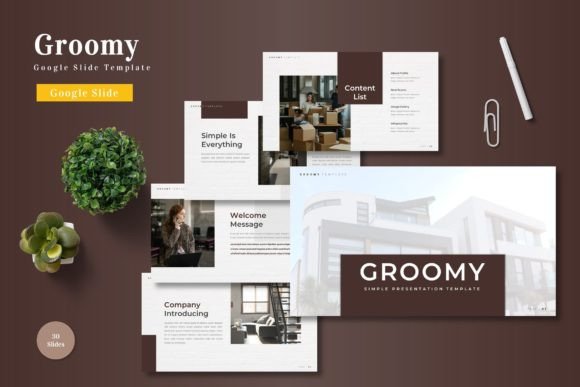
Groomy - Google Slide Template: Visual Harmony for Modern Brands
There’s a particular frustration that comes with opening a blank presentation file. You have the ideas, the data, the strategy—but the visual framework feels like a hurdle. You need something polished, something that doesn’t scream “default template,” but also doesn’t require a design degree to customize. This is where a well-crafted asset changes the workflow entirely. The Groomy - Google Slide Template isn’t just a collection of slides; it’s a structured visual system designed to bring clarity and style to your communications without the usual design headaches.
A Design System, Not Just a Slide Deck
What immediately stands out about Groomy is its comprehensive nature. With over 150 total slides built across five premade color schemes, it offers a depth that goes far beyond a basic presentation. Each of the five variations contains 30 meticulously arranged slides, giving you ample room to build narratives for different projects or clients without repeating the same visual layout. This isn’t about having one good slide and twenty mediocre ones; it’s about consistent quality throughout. The inclusion of section break slides is a subtle but critical detail—it allows for clean visual pauses in your story, helping to segment information logically for your audience.
The foundation of the template is its use of Master Slides. For anyone who has wrestled with formatting inconsistencies across a lengthy presentation, this is a game-changer. Edits made to the master automatically propagate, ensuring that fonts, colors, and logo placements remain uniform. This built-in consistency is a direct boost to your professional presentation. Whether you’re a small business owner preparing a pitch deck or a marketer outlining a campaign strategy, the result is a cohesive document that reinforces credibility from the first slide to the last.
Infographics and Visual Storytelling
Data and abstract concepts often need a visual interpreter. Groomy addresses this with handcrafted infographics that are both functional and aesthetically aligned with the overall template style. These aren’t generic clip-art charts; they are designed to be editable and resizable, meaning you can adjust them to fit your specific content without breaking the design. The pixel-perfect illustrations serve a similar purpose—they add visual interest and professionalism without distracting from your core message.
Consider the practical applications. A content creator could use the portfolio and gallery slides to showcase recent work in a client meeting. A startup founder might use the infographic layouts to simplify complex market analysis for investors. The picture placeholder feature, with its drag-and-drop functionality, means you can personalize these visuals quickly. Swapping in your own product shots, team photos, or brand imagery turns a generic framework into a powerful tool for visual communication and brand recognition.
Practical Applications Across Creative Projects
The utility of a template like Groomy extends far beyond the boardroom. Think of it as a versatile design asset for multiple facets of your brand or business.
- Brand Identity & Marketing: Use the consistent layouts to create branded training materials, internal communications, or sales decks that all feel part of the same family. This strengthens brand identity across all touchpoints.
- Digital Products & Courses: For educators and coaches, the template can be the backbone for a visually engaging online course or a downloadable PDF workbook. The structured slides help organize lessons and modules logically.
- Social Media & Content Creation: Individual slides can be exported as images and repurposed for Instagram carousels, Pinterest pins, or LinkedIn posts. The clean typography and balanced layouts translate well to static social media graphics.
- Print Materials: While digital-first, the high-quality design elements are also suitable for print. Think conference handouts, simple one-page flyers, or even the interior layout for a small booklet or zine.
This adaptability is key for entrepreneurs and hobbyists who often wear many hats. You don’t need separate tools for every task; a single, well-designed system can streamline the creation of diverse assets, from a professional pitch to a set of engaging social media graphics.
Making It Your Own: Customization and Considerations
A template’s real value is revealed in how easily it can be adapted. Groomy’s structure encourages customization. The five color schemes provide a starting point, but you can easily apply your own brand palette using the master slides. The resizable graphics mean you aren’t locked into a single composition. However, a practical tip: when customizing, maintain the underlying grid and spacing principles. The template’s visual harmony comes from its careful alignment and proportion—respecting that even as you change colors and images will preserve its professional feel.
Typography within the template plays a crucial role in readability and tone. While the template comes with its own suggested fonts (details typically found in the included Readme file), you can experiment with pairing. For instance, you might use a clean sans-serif font for body text to ensure clarity, and pair it with a more distinctive display font for headings to add personality. Always test your font pairings on a few slides before committing to the entire deck. Consider the context: a formal investor pitch might call for more restrained typography than a creative workshop presentation.
Finally, remember the commercial licensing. Since this is a premium template, ensure its use aligns with the license terms, especially if you’re creating materials for clients or for resale, like in a digital product. Understanding these details upfront prevents issues down the line and is part of working professionally with any design asset.
In the end, tools like the Groomy template exist to solve a specific problem: bridging the gap between a great idea and a polished, professional presentation of that idea. It provides the visual scaffolding so you can focus on what you do best—whether that’s building a business, teaching a skill, or sharing a story. The goal isn’t to have the flashiest slides, but the most effective ones, and a thoughtfully designed system is often the fastest path to achieving that.