Jerambah: A Versatile Google Slides Template for Dynamic Presentations
You know the feeling. You're prepping for a crucial pitch, a workshop, or a client update, and the thought of starting a slide deck from scratch feels like a chore. You need something polished, cohesive, and ready to adapt—without spending hours wrestling with layouts. That's where a thoughtfully designed template like Jerambah comes into play, offering a structured yet flexible foundation for your visual storytelling.
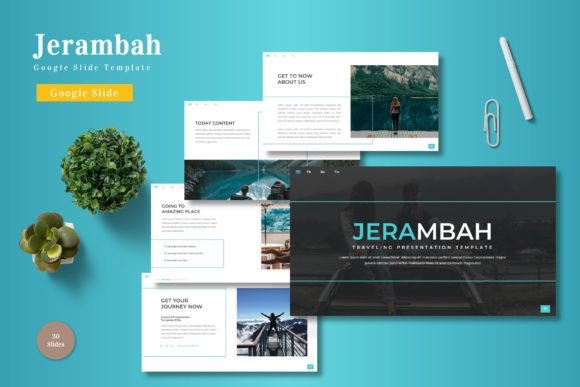
This isn't just about pretty slides. It's about creating a seamless visual experience that holds attention and reinforces your message. With over 150 slides across five color schemes, Jerambah provides a substantial toolkit. Each of the five templates contains 30 meticulously crafted slides, giving you ample room to build a narrative without repetition. The inclusion of section break slides is a subtle but powerful touch, helping to segment your content logically and give your audience natural pauses to absorb information.
Building Visual Consistency Across Your Brand Materials
One of the biggest challenges in branding is maintaining a consistent look and feel. Jerambah's strength lies in its cohesive design system. Because it's built on master slides, any change you make to a master layout—like updating a color accent or a font style—propagates throughout your entire presentation. This ensures every slide feels like part of the same family, which is crucial for building brand recognition.
Think beyond the slide deck itself. The handcrafted infographics and pixel-perfect illustrations included are not confined to presentations. Export a slide as an image, and you have a ready-made social media graphic for Instagram or LinkedIn. Use the layout of a portfolio slide as inspiration for a website gallery page. The clean, modern typography and balanced compositions can inform the design of your business cards, email newsletters, or even product packaging mockups. The template becomes a central hub for your visual identity, ensuring the aesthetic you establish in a pitch carries over to your marketing assets and digital products.
Practical Applications for Entrepreneurs and Creators
For a small business owner, time is a finite resource. Jerambah's drag-and-drop picture placeholder functionality is a game-changer. Instead of cropping and resizing images manually for each slide, you simply drag your photo into the designated area, and it fits perfectly. This efficiency is invaluable when creating client proposals, quarterly reports, or investor decks where timely, professional delivery is key.
Content creators and marketers will appreciate the template's adaptability. The gallery and portfolio slides are perfect for showcasing work, whether you're a photographer, a graphic designer, or a consultant highlighting case studies. The section breaks allow you to structure a webinar or online course into clear modules. Furthermore, the five pre-made color variations offer an instant way to tailor the presentation's mood to different audiences or campaign themes, saving you the time of customizing color palettes from scratch.
Maximizing Impact with Thoughtful Design Choices
While the template provides a robust starting point, its true potential is unlocked through customization. Here are a few practical tips for making it your own:
- Align with Your Brand Palette: Even with five color schemes, take a moment to adjust the master slide colors to match your exact brand hex codes. This small step deeply integrates the deck into your existing brand identity.
- Choose Typography Intentionally: The readme file included in the download will specify the fonts used. If they don't align with your brand's typeface, consider swapping them. Pair a clean sans-serif for body text with a distinctive serif or script font for headings to create visual hierarchy and interest. Testing font pairings is essential for readability, especially on projected screens.
- Focus on One Idea Per Slide: Use the structured layouts to avoid clutter. The templates are designed to guide you toward clean, impactful communication. Let the visuals and concise text work together.
- Customize for Different Formats: Don't be afraid to repurpose slides. A beautifully designed data infographic from your presentation can be adapted into a blog post header or a printable poster for an event. The resizable and editable graphics make this process straightforward.
Remember, the goal is not to use every slide, but to select the ones that best serve your story. The variety available—from text-heavy layouts to image-focused grids—means you can tailor the flow to your specific content, whether it's for an educational workshop, a product launch, or a creative portfolio review.
From Slides to Tangible Brand Assets
Consider the lifecycle of a single presentation. After the meeting, the visual work doesn't have to end. You can extract key slides to create:
- Social Media Content: Use quote slides, key statistic callouts, or single-image slides as standalone graphics for platforms like Pinterest or Twitter.
- Print Materials: Adapt the clean layouts for one-page flyers, tri-fold brochures, or informational sheets for trade shows.
- Digital Resources: Compile a series of instructional slides into a downloadable PDF guide or an e-book, using the template's cohesive style to give it a professional, polished feel.
- Web Elements: Use the infographic styles as inspiration for charts on your website or as engaging visuals in your email marketing campaigns.
This approach transforms a single design asset into a multi-channel brand toolkit, enhancing visual consistency and saving significant design time across projects. It’s about working smarter, using a strong foundation to maintain professionalism whether you're presenting live, online, or in print.
Ultimately, a tool like Jerambah is about removing friction from the creative process. It provides a professional scaffold that allows your ideas to shine without the technical barriers of design from scratch. By leveraging its structured slides, consistent style system, and editable elements, you can focus more on your message and less on the mechanics of layout—ensuring your final product, whether a pitch deck or a marketing brochure, looks intentional, cohesive, and ready to engage your audience.